
Stay informed
Receive info about discounts, government energy support, and important account updates


Stay informed
Receive info about discounts, government energy support, and important account updates

Enjoy exclusive rewards
Access extra discount like Keypad Reward & Power NI Perks

Top up anytime, anywhere
Top-up quickly on your Power NI online account and mobile app at any time

Manage your account with ease
View letters and statements all in one place and keep your account details up-to-date for peace of mind

Get exclusive discounts with Power NI Perks!
Registered Power NI customers get access to discounts on 100s of brands, plus free cinema ticket drops throughout the year! It's our way of saying thank you for being a Power NI customer. Don't miss out on your chance to get a whole lot more, for a whole lot less. Join over 100,000 customers already saving through Power NI Perks.
Join Power NI Perks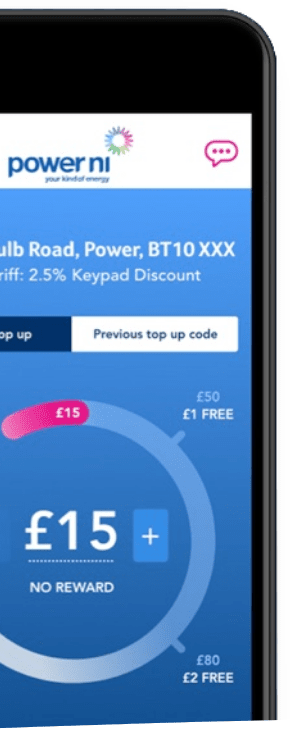
Vulnerable customers
We understand that all our customers are different, and some might need our help to make things a bit easier to manage.
Explore additional services1. There are several ways you can buy a Keypad top-up:
Online or using our app, why not register or login now.
24-hour automated phone service visit our contact us page and select option 1 when calling.
At any PayPoint or Post Office outlet.
Please note: credit cards are not accepted when topping up through our app, online or phone service.
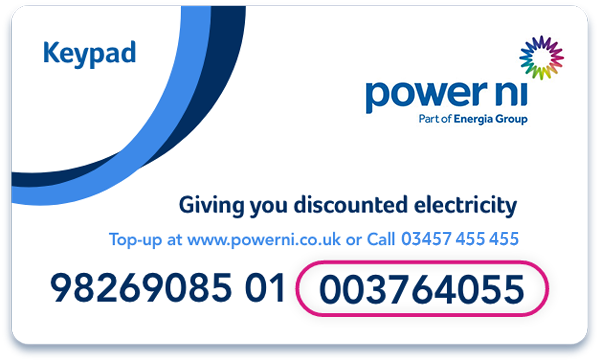
You’ll need to have your card details and your 19 digit premise number which can be found on your Keypad card when topping up.
2. When payment is approved you will get a 20 digit top up code.
3. Enter this top up code on your Keypad
Press the ‘*’ button and then the 20 digit top up code.
If you make a mistake press the ‘*’ button to delete a character.
When you've entered the entire top up code press the ‘#’ button to finish.
If entered correctly an 'accepted' message will display.
For further help with topping up read our simple step-by-step guide.
You can still purchase top-ups without your Keypad card, if you have your 19 digit premise number. This should begin with the numbers ‘98269’ and can be found on a previous top-up receipt.
If you don’t have a previous receipt contact us and we'll provide you with your 19 digit premise number and order you a new card. For help with topping up read our simple step-by-step guide.
You can order a replacement card by filling in an online form and we will send a new card in the post.
Every household is different, however there are common themes that occur in most households regarding energy consumption. Acknowledging which electrical appliances use the most electricity and understanding basic energy saving tips, can have a positive impact in terms of a lower electricity bill.
Our friendly credit means that we’ll continue to supply you if you’ve run out, even at less social hours.
To give you enough time to buy a top-up, friendly credit is given automatically on:
Weekdays - if your credit runs out after 4pm (winter) or 5pm (summer), Monday to Thursday, the supply will stay on until 8am* (winter) or 9am (summer) the following day.
Weekends - if your credit runs out after 4pm (winter) or 5pm (summer) on a Friday, the supply will stay on until *8am (winter) or 9am (summer) the following Monday.
Holidays - friendly credit will not run out on any of the following dates and your supply will stay on until 8am* (winter) or 9am (summer) the following working day: 1st January, 17th March, 12th July and 25th December.
* 11am (winter) and 12pm (summer) with Economy 7, Electricity Vehicle tariff or extended friendly credit.
Remember, the next time you buy electricity, the amount of emergency credit and friendly credit used will be deducted from your balance.
When you turn the low-credit warning sound off you will automatically get £3 emergency credit. If you do not turn the warning sound off, your supply will switch off. Should this happen, simply press any button and your £3 emergency credit will come back on after a few seconds.
Please note that emergency credit increased from £1 to £3 on 1 August 2023.
If your top up code is being rejected, firstly check you are pressing the ‘*’ button, followed by your 20 digit top up code then the ‘#’ button to finish.
If the code is still being rejected, please:
Check that you have entered all digits correctly.
Ensure that your code is entered as one long number.
Check the 19 digit premise number on your Keypad card matches the one on your receipt, website or app and begins with ‘98269’.
Check that you have topped up using your own card rather than a friends or relatives as it relates only to your Keypad meter.
For customers making online payments, please remember that when topping up online, you may need to confirm your payment with your bank or building society. Please follow their usual online payment process to complete your transaction and make sure that your top-up purchase is completed successfully.
Accepted: Your top up code has been accepted. Your Keypad will show the amount of electricity you have bought followed by the word ‘account’ and the total amount of credit you have.
Rejected: The meter has rejected the top up code. This will be followed by a message telling you why the number was rejected. If this appears wait until the fault message clears and start from the beginning again.
Duplicate: This top up code has already been added to your Keypad. Wait until the message clears, press the ‘*’ button and enter the new top up code. Make sure it’s not one you’ve used before. If you press button ‘4’ you can see the last five top up codes entered into your Keypad.
Incorrect: You have entered the incorrect top up code. Wait until the message clears, press the ‘*’ button and then re-enter the number.
Wrong Tar: You have not entered the most recent tariff change code which we issue when there have been changes to the rate your electricity is charged. If you’ve lost your tariff change code, you can find it in your online account. If you purchased in store within the last 14 days, the code can be retrieved by contacting us. Once you have entered the tariff change code you will be able to enter the last top up code you bought. If you need help with this outside our working hours, or your electricity supply is off, please call Northern Ireland Electricity Networks on 03457 643 643 (available 24 hours a day, seven days a week).
Credit Hi: You have too much credit on your meter (the maximum limit is £999.99). Keep your top up code in a safe place until you have used up some credit and then you can use it.
Error: There has been a delay of more than 20 seconds between entering each digit, you may need to re-enter your top-up code more quickly.
Kblock: This means that your top up code has been rejected five times in a row. Wait until the message clears, then re-enter your top up code.
Overload: This means you have used too much electricity for your Keypad meter. This can sometimes happen if you are using too many appliances at once. To fix this, press and hold the ‘0’ key for up to 10 seconds. More on the Keypad overload error can be found here.
If your error message is not listed above please contact us.