Information for Keypad customers

From 16 June, when you buy a top-up you will receive a 40-60 digit price change code. Please enter the full code into the meter. If you're experiencing issues topping up email us at [email protected]. Our customer care team are responding to emails 9am to 10pm during the weekday and 9am to 1pm over the weekend.

Meters & Readings

How do I read my dual meter for Economy 7 or EV Nightshift tariff?

  • My Home
  • Meters & Readings
  • Meter readings

There are a few different types of meter. To help you with reading your meter please find your correct meter type below.

Keypad meter: 

Push 3 on the freedom unit for the first read.
Push 3 again for the second reading.

Keypad-(2).jpg
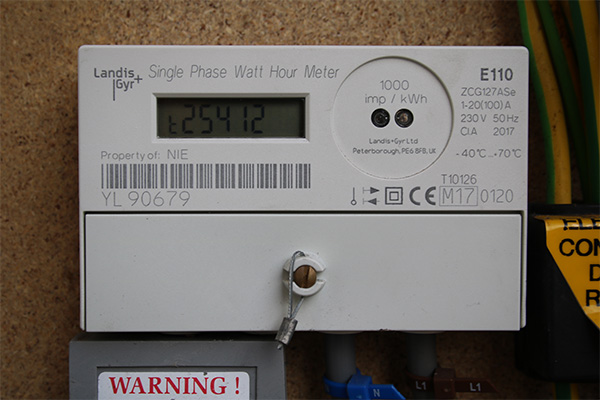
Digit meter:

Push the button to scroll through the display.
Take the reading displayed after Rate 1 or R1.
Then take the reading displayed after Rate 2 or R2.

Digital-meter.jpg

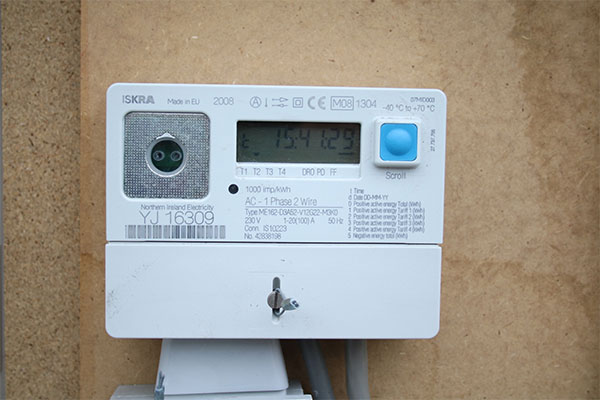
Import/export meter (if you have renewable technology installed):

For the day rate, press the blue button repeatedly until you see a small “1” in the corner of the display and take the reading.

For the night rate, press the blue button repeatedly until you see a small “2” in the corner of the display and take the reading.

Economy-7-EV.jpg

Still have questions?

Our team of energy experts would be happy to answer any questions. We’re here to help.

Contact us

Chat person

Mandatory fields

By submitting this form you consent to Power NI contacting you in relation to this enquiry. For details on how we use your information, please view our Privacy Statement.